Complaint management for societies & campuses
Smart Society, Smart Maintenance.
Report, track and resolve maintenance issues in your facility with just a photo. Fast, transparent and reliable.
Available on mobile
Hello Aman 👋
Explore Society
My Complaints
Core features
Everything a maintenance request needs — in one ticket
Photo proof, a live status, automatic routing to the right department, and society-wide announcements — all in one place.
Photo Evidence
Complete transparency with "Before" and "After" picture uploads on every ticket.
Live Tracking
Real-time status updates as your complaint moves from Pending to In Progress to Done.
Departmental Routing
Every complaint lands with the right department automatically — no manual triage in the middle.
Announcements
Publish a notice once and it reaches every resident in the app, right beside their complaints.
The problem
Facility maintenance shouldn't run on WhatsApp.
Most societies aren't short of people willing to fix things — they're short of a single place to record what broke, who is on it, and whether it was actually finished. Anytime Help gives every complaint a ticket, an owner and a photograph of the result.
See how a complaint moves through the system- Complaints lost in WhatsApp groups and phone calls
- No proof that a job was actually finished
- Residents chasing the office for a status update
- Staff sifting through issues that are not theirs
- No record of how long anything actually took
Proof, not promises
A photo when it breaks. A photo when it's fixed.
Every complaint carries a "Before" image from the resident who reported it and an "After" image from the staff member who closed it. Nobody has to take anybody's word for it, and the record stays attached to the ticket.
- Before
- Attached at report time by the resident.
- During
- Status updates as the work happens.
- After
- Resolution photo uploaded before closing.
Complaint #1042
Plumbing · Block A, 2F
Leaking tap in corridor
DoneRaised 2 Aug · Resolved 4 Aug
Before
Aman S. · resident
2 Aug, 09:12
After
R. Kumar · plumbing
4 Aug, 16:38
Features
Built around how a complaint actually gets fixed
Every screen maps to a real step — spotting the problem, proving it, routing it, and closing it out with evidence.
Photo Evidence
Every ticket carries proof — a "Before" photo when it is raised, an "After" photo when it is closed.
- Attach a Before image while reporting
- Staff upload an After image on resolution
- Side-by-side proof of the fix
- No more "it was already like that"
- Photos stay attached to the ticket history
- Works from any phone camera
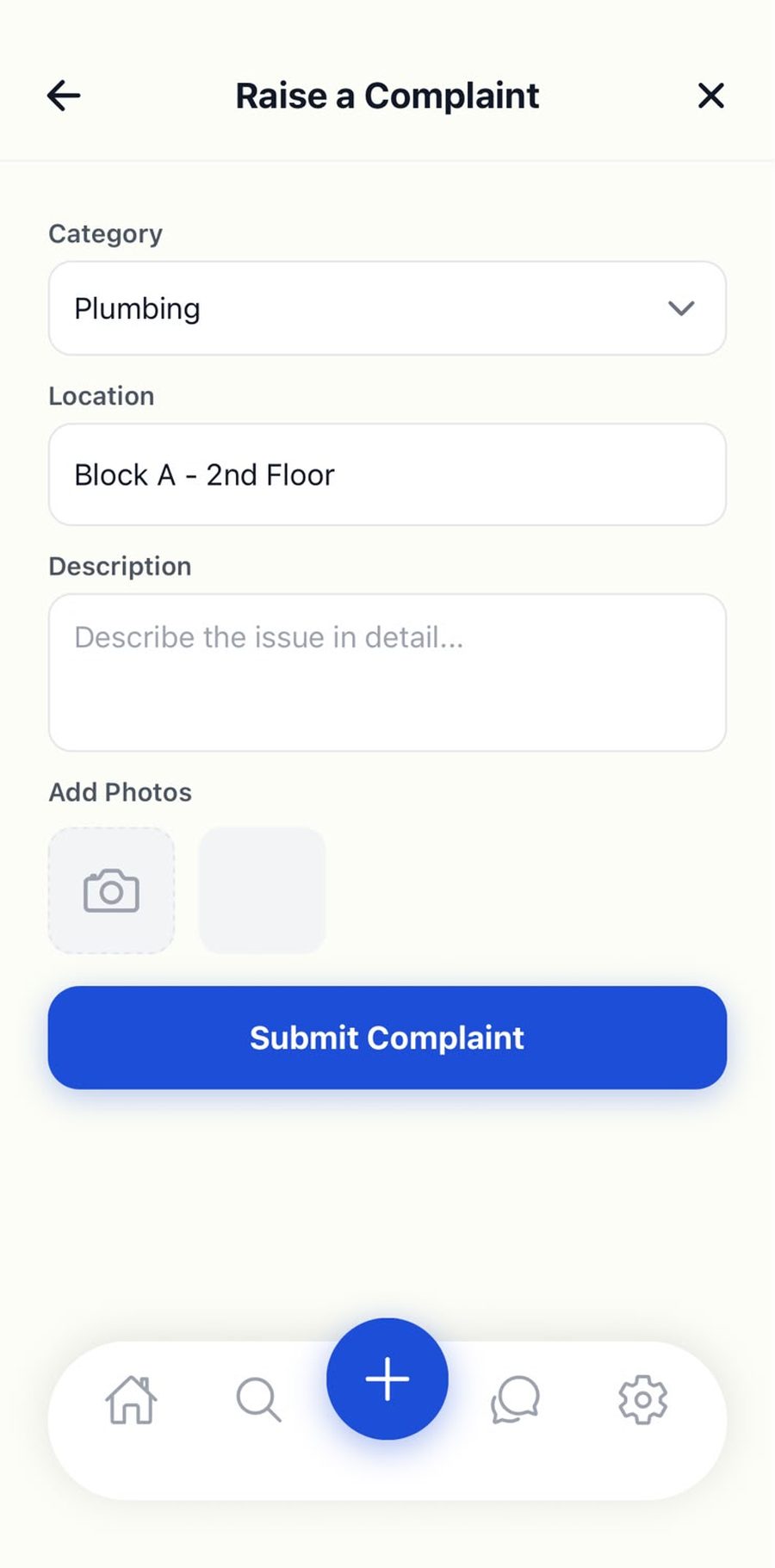
Live Status Tracking
Watch a complaint move through its full lifecycle without ringing the facility office once.
- Pending → In Progress → Done
- Live updates as staff act
- Priority tags: Low, Medium, High
- Category and location on every ticket
- Full timeline of who did what
- Nothing quietly disappears
Complaint #1042
Plumbing · Block A
Leaking tap in corridor
HighBlock A · 2nd Floor · Raised 2 days ago
Status
- PendingTicket created
- In ProgressAssigned to R. Kumar
- DoneAwaiting resolution photo
Before
After
Departmental Routing
Complaints land with the right department automatically — Plumbing, Electrical, Cleaning, Security, HVAC.
- Category chosen at report time
- Routed to the matching department
- Staff see only their own queue
- No manual triage in the middle
- Admins can add departments
- Faster first response
Plumbing queue
R. Kumar · Staff
4
Pending
2
Active
9
Done
Assigned to you
How it works
From spotting a problem to proof it was fixed
Four steps, and the only one that needs the resident is the second.
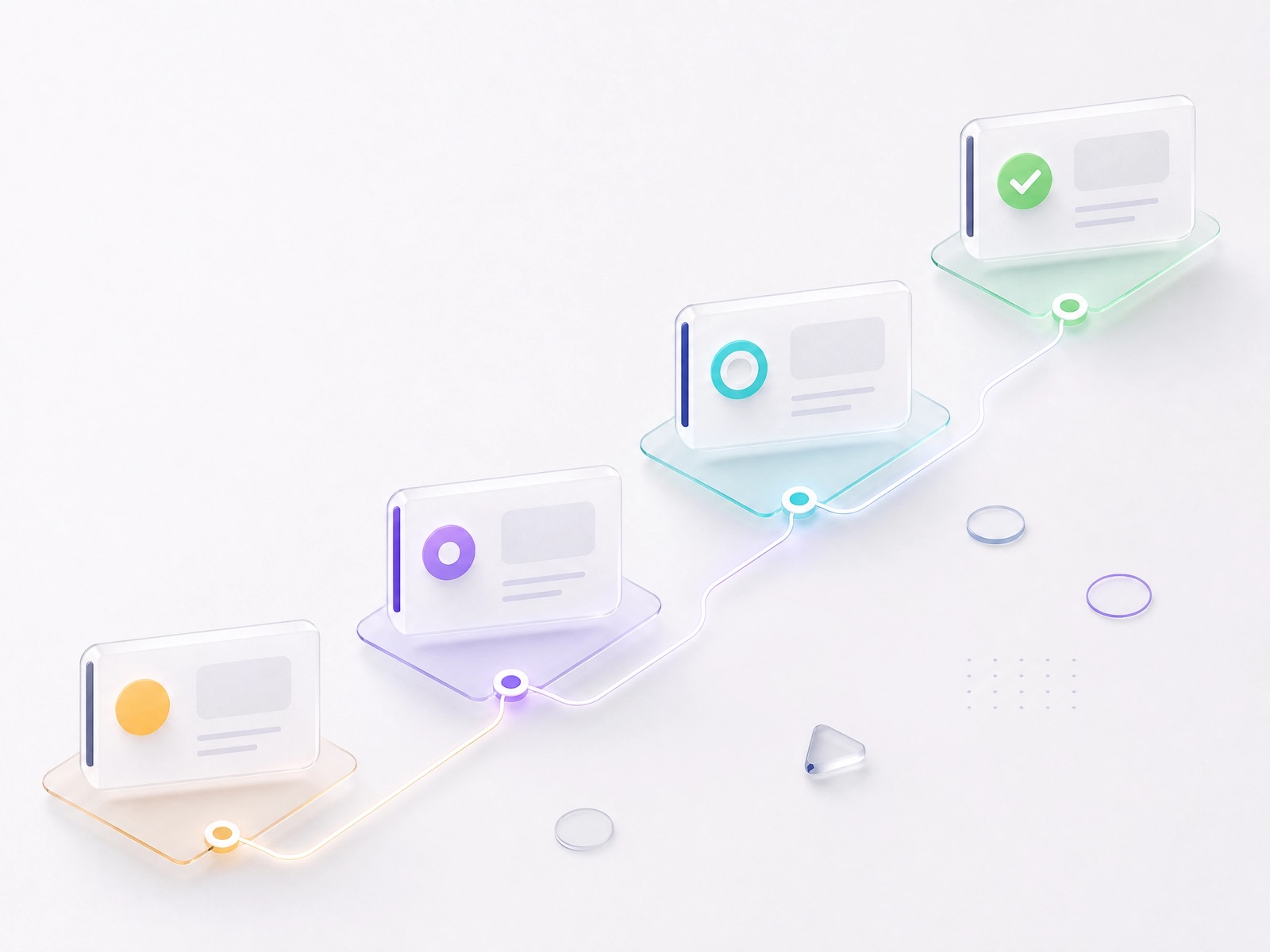
Step 1
Spot the Issue
A leaking tap, a dead corridor light, a lift that keeps stopping — anything that needs fixing.
Step 2
Snap & Submit
Open the app, pick a category and location, add a photo, and submit. It takes under a minute.
Step 3
Staff Assigned
The relevant department — Plumbing, Electrical, Cleaning — is notified instantly and picks it up.
Step 4
Resolved
Staff fix the issue, upload an "After" photo as proof, and close the ticket. You see it happen live.
Tailored for everyone
One platform, three very different jobs
Residents, staff and admins each get a view built for what they need to do — and nothing they don’t.
For Residents
Tenants, owners and family members
A frictionless way to get things fixed in your home or society — report it, then get on with your day.
- Raise a complaint with a photo in under a minute
- Track it live from Pending to Done
- See the resolution photo when it is closed
- Get notified as the status changes
- See society announcements in one feed
For Staff
Plumbing, Electrical, Cleaning, Security, HVAC
A clutter-free workspace that shows only the tasks belonging to your department — nothing else.
- Only complaints for your category
- Update status as the work progresses
- Upload the After photo to close it out
- Category and location on every job
- Clear priority order for the day
For Admins
Facility and society managers
A bird’s-eye view of every operation, department and staff member, from one dashboard.
- Oversight of all complaints across the facility
- Manage departments and route categories
- Broadcast announcements to every resident
- Manage resident and staff accounts
- See what is ageing and what is done
Get the app
Your society's maintenance desk, in your pocket.
Raise a complaint from the corridor where you found the problem, follow it while you get on with your day, and see the resolution photo the moment the job is closed.
Download Anytime Help
Managing a facility?
Admins and staff work from the web dashboard — full oversight of every complaint, department and announcement.
Complaint #1042
Plumbing · Block A
Leaking tap in corridor
HighBlock A · 2nd Floor · Raised 2 days ago
Status
- PendingTicket created
- In ProgressAssigned to R. Kumar
- DoneAwaiting resolution photo
Before
After
FAQ
Frequently asked questions
What residents, staff and facility managers usually ask before getting started.
What is Anytime Help?
Anytime Help is a complaint and issue management platform for residential societies, campuses and organisational facilities. Residents report maintenance issues from a mobile app, staff resolve them from their own queue, and admins oversee everything from a web dashboard.
Who is it for?
Three groups. Residents raise and track complaints. Staff receive the complaints for their department and resolve them. Admins manage departments, accounts, announcements and the full complaint picture.
How do I report a maintenance issue?
Open the app, tap the add button, choose a category such as Plumbing or Electrical, enter the location and a short description, attach a photo, and submit. The ticket reaches the right department immediately.
Can I see proof that the work was done?
Yes. Residents attach a "Before" photo when reporting and staff upload an "After" photo when closing the ticket, so every resolution carries visual evidence.
How do staff know which complaints are theirs?
Every complaint is filed under a category that maps to a department. Staff only ever see the complaints routed to their own department, so their queue stays clean.
Is there a web dashboard for admins?
Yes. Admins work from a web dashboard with oversight of all complaints, departments, staff and resident accounts, plus the ability to broadcast announcements to every resident in the app.
Is my data secure?
Accounts are authenticated through Firebase Authentication and your society’s data is only accessible to its own residents, staff and admins. We do not publish security or compliance certifications we have not been independently audited for — if you have specific requirements, contact us and we will answer them directly.
How much does it cost?
Pricing depends on the size of your facility and the number of departments you run. Get in touch and we will put together the right plan for your society or campus.
How do we get started?
Contact us to set up your facility, departments and admin account. Once that is done, residents download the app and can start reporting straight away.
Ready for a society that fixes things faster?
Download the app to start reporting, and let your facility resolve issues faster.